


Digital clutter builds up quickly. Screenshots multiply, emails pile up, downloads get lost and unused apps fill your phone. Over time, these small things can make your digital life feel surprisingly overwhelming. A digital declutter helps you remove what you no longer need, organize important files and create a simpler digital environment that is easier to manage. In this guide, you will learn how to declutter your phone, laptop, email, photos and files step by step without trying to organize everything at once.
How to Do a Digital Declutter and Organize Your Digital Life
Why Digital Clutter Can Feel So Overwhelming
Physical clutter is easy to notice because you can see it sitting on a table, filling a drawer or covering your desk. Digital clutter is different. Thousands of files can exist inside one small laptop and hundreds of unfinished digital tasks can hide behind a single phone screen. Because they are not physically taking up space around you, it is easy to underestimate how much information you are managing.
Every notification, unread message, open browser tab and badly named file can become another small decision waiting for your attention. Individually, these things may seem insignificant, but together they create friction. Instead of opening your laptop and immediately beginning your work, you may spend several minutes looking for a document, closing unnecessary windows or trying to remember where you saved something.
The goal of digital organization is therefore not simply to make your devices look cleaner. A useful system should reduce the number of unnecessary decisions you have to make and make important information easier to retrieve. The best digital organization system is usually not the most complicated one. It is the one you can understand quickly and maintain without constantly reorganizing it.
Start With a Digital Brain Dump Before You Delete Anything
When everything feels disorganized, immediately opening folders and deleting random files can actually make the process feel more overwhelming. Before cleaning anything, identify the areas that are creating the most friction.
Think about what regularly annoys you when you use your devices. Perhaps your phone storage is almost full because of photos and videos. Maybe your desktop is covered with documents. Your email inbox may contain thousands of unread messages, or your Downloads folder may have become the place where every file goes and nothing ever leaves.
Write these problem areas down before you begin. This creates a simple digital declutter plan instead of one enormous task called organize my digital life.
You might decide that your priorities are your phone, photos, email, computer files and subscriptions. Once you can see the categories separately, you can work through one area at a time. You do not need to finish everything in one afternoon. Completing one category properly is usually more useful than partially cleaning ten categories and becoming too overwhelmed to continue.
Declutter Your Phone by Removing What You No Longer Use
Your phone is a good place to begin because it is probably the device you interact with most frequently. Start by looking through your installed apps and asking a simple question about each one. Do I actually use this?
Delete apps you no longer need, including old games, shopping apps you downloaded for one purchase, duplicate tools and services you stopped using months ago. If you are uncertain about an app, consider whether reinstalling it later would be difficult. In most cases, deleting an unused app is reversible, which makes the decision much easier.
After reducing the number of apps, organize what remains according to how you actually use your phone. Frequently used tools should be easy to access, while occasional apps can be grouped into simple categories. Avoid creating an elaborate folder system that requires you to remember where dozens of applications belong. Your system should make your phone faster to navigate, not give you another organizational project to maintain.
Turn Off Notifications That Do Not Deserve Your Attention
Notifications are one of the most overlooked forms of digital clutter. They may not consume much storage space, but they consume attention.
Review your notification settings and consider which alerts genuinely require immediate awareness. Messages from people you communicate with, calendar reminders or important financial notifications may be useful. Promotional notifications, shopping updates, game alerts and constant social media activity often do not require the same level of access to your attention.
Turning off unnecessary notifications does not mean you are ignoring those applications. You can still open them when you choose. The difference is that you decide when to give them your attention rather than allowing every application to decide for you. This small change can make a phone feel dramatically calmer without deleting a single additional file.
Clean Up Photos and Screenshots Without Trying to Organize Everything
Photo libraries become overwhelming because they grow continuously. Trying to perfectly categorize years of photographs can turn a digital declutter into a project that never ends.
Start with the easiest things to remove. Delete blurry photographs, accidental screenshots, duplicates, old receipts you no longer need and temporary images that served a purpose at the time but no longer have value. Screenshots are particularly useful to review because many are simply temporary reminders that were never intended to become permanent records.
After removing obvious clutter, create only a few albums for categories you genuinely return to. Important family photographs, travel, work references or inspiration might deserve dedicated albums, but every photograph does not need to belong to one. The objective is retrieval. If your photo organization system helps you find important images more easily, it is working.
Give Your Computer Desktop a Clear Purpose
A cluttered desktop often develops because it becomes a temporary storage area for everything. Documents are downloaded, screenshots are saved and files are dragged onto the desktop with the intention of organizing them later.
Instead of trying to keep your desktop permanently empty, decide what it is allowed to contain. You might use it only for files related to current projects or tasks that require action this week. Once something is completed, it moves to its permanent location.
This turns the desktop into a temporary workspace rather than a permanent storage system. If you currently have hundreds of files on your desktop, do not spend hours deciding where every individual item belongs. Begin by moving obvious categories into broader folders such as Documents, Personal, Work, Finance or Archive. You can refine those folders later if necessary.
Finally Clean Out Your Downloads Folder
The Downloads folder is one of the easiest places for digital clutter to accumulate because files arrive there automatically. PDFs, images, receipts, forms, documents and installation files can remain long after you have finished using them.
Sort the folder by date and begin with older files. Delete anything you clearly no longer need. Move important documents to their permanent folders and rename files that would otherwise be difficult to identify later. This is also a useful opportunity to notice what you repeatedly download. If you frequently download invoices, educational resources or business documents, those categories may deserve their own permanent folders.
Your Downloads folder should ideally function as an inbox. Files arrive there temporarily, but important files eventually move somewhere more intentional.
Create a Folder System You Can Actually Remember
A common organization mistake is creating too many folders. A highly detailed filing system may look impressive when you first create it, but it becomes useless if you cannot remember where something belongs. Start with broad categories that reflect your real life. You might have folders for Personal, Work, Finance, Family, Education and Archive. Within those folders, create subfolders only when there is enough content to justify them.
For example, Finance could contain Taxes, Banking, Receipts and Invoices. Work could contain Clients, Projects and Resources. Education could contain Courses, Notes and Study Materials. Naming conventions also matter. A file called document-final-new2.pdf tells you very little six months later. A descriptive filename containing the subject and, when relevant, the date makes searching much easier.
Think about your future self whenever you name something. Ask whether you would understand what the file contains without opening it.
Organize Your Email Inbox by Reducing Incoming Clutter First
An inbox containing thousands of emails can make people believe they need to manually organize every message. Usually, the more effective first step is stopping unnecessary email from arriving. Search your inbox for newsletters, promotional emails and automated updates you consistently ignore. Unsubscribe from those you no longer want. This changes the problem at its source rather than repeatedly deleting the same types of messages.
Next, deal with emails that require action. Reply to messages that can be handled quickly, save important information where it belongs and archive messages that no longer require your attention. You do not necessarily need an empty inbox. The more useful goal is an inbox where important messages are visible and irrelevant messages are not constantly competing with them.
If you receive large amounts of email, filters and labels can also help automatically separate receipts, newsletters, work correspondence and other recurring categories.
Close the Browser Tabs You Are Keeping as Reminders
Open browser tabs often function as an accidental to do list. An article you want to read stays open. A product you are considering stays open. A form you need to complete stays open. Eventually you have dozens of tabs representing dozens of unfinished intentions.
Go through them intentionally. Complete anything that takes only a few minutes. Bookmark resources you genuinely want to keep. Add actual tasks to your task list or calendar rather than keeping a tab open as a reminder. Close anything that no longer matters.
The same principle applies to bookmarks. A bookmark collection containing hundreds of forgotten links is not particularly useful. Keep resources you are likely to return to and remove outdated or irrelevant pages. Your browser should support what you are currently doing rather than constantly displaying everything you once considered doing.
Review Your Digital Subscriptions
Digital clutter can also cost money. Streaming services, cloud storage, premium apps, software memberships and other subscriptions can continue charging long after you stop using them.
Review your bank statements, app store subscriptions and email receipts to identify recurring payments. For each subscription, consider whether you actively use the service and whether it still provides enough value to justify the cost. Cancel subscriptions you no longer need and keep a simple record of the services you retain, their cost and renewal dates.
This is one area where digital organization and financial organization overlap. A regular subscription review can reduce both digital clutter and unnecessary spending.
Organize Your Digital Calendar Around Commitments, Not Aspirations
A calendar becomes less useful when it contains so much information that important commitments disappear among optional tasks.
Use your calendar primarily for things connected to time. Appointments, deadlines, meetings, school events, payment dates and scheduled work sessions belong naturally there. Tasks that can happen at any time may work better in a separate task list.
Review recurring events occasionally as well. Old reminders and outdated recurring appointments can remain on calendars for months or years simply because nobody thinks to remove them. A clean calendar should allow you to look at your week and quickly understand where your time is already committed.
Back Up the Files You Cannot Replace
Decluttering should never mean carelessly deleting important information. Before removing large amounts of data, make sure irreplaceable files have an appropriate backup.
Important photographs, business documents, financial records, personal documents and significant creative work should not exist in only one location. Devices fail, files become corrupted and phones can be lost.
Your backup system does not need to be complicated, but it should be intentional. Decide which information is important enough to protect and make sure another reliable copy exists. Digital organization is not only about removing information. It is also about protecting the information that matters.
Create a Ten Minute Weekly Digital Reset
The easiest digital declutter is the one you do not have to repeat from the beginning.
Instead of waiting until your devices become overwhelming again, create a short weekly digital reset. Spend approximately ten minutes deleting unnecessary screenshots, clearing your Downloads folder, moving important files, checking your inbox, closing browser tabs and reviewing the coming week on your calendar.
You do not have to complete every possible digital organization task during each reset. The purpose is maintenance. Small amounts of regular maintenance prevent digital clutter from reaching the point where organizing it requires an entire weekend.
Use a Digital Declutter Checklist When You Feel Overwhelmed
If your digital life currently feels chaotic, avoid trying to remember every area you need to organize. A checklist allows you to work systematically without repeatedly deciding what to do next.
Start with your phone and remove unused apps. Review notifications. Clean screenshots and unnecessary photos. Move to your computer and clear your desktop and Downloads folder. Organize important documents into simple folders. Then review email, browser tabs, bookmarks, subscriptions and your calendar. Finally, make sure important files are backed up.
You can complete one category each day or work through several sections when you have more time. Progress does not depend on finishing the entire checklist in one sitting. The purpose of a checklist is to remove the mental work of figuring out what comes next.
How to Keep Your Digital Life Organized
The most effective digital organization system is not one that stays perfectly clean. It is one that is easy to reset.
New emails will arrive. You will take more screenshots. Files will appear in Downloads. Your desktop will occasionally become messy again. None of this means your system failed. What matters is whether you know where things should eventually go.
Give important information a logical home, reduce unnecessary incoming information and regularly clear temporary spaces such as your inbox, desktop and Downloads folder. When every part of your digital life has a simple purpose, maintaining it requires much less effort.
You also do not need to organize information simply because it exists. If you no longer need something and there is no meaningful reason to keep it, deleting it may be more useful than creating another folder for it.
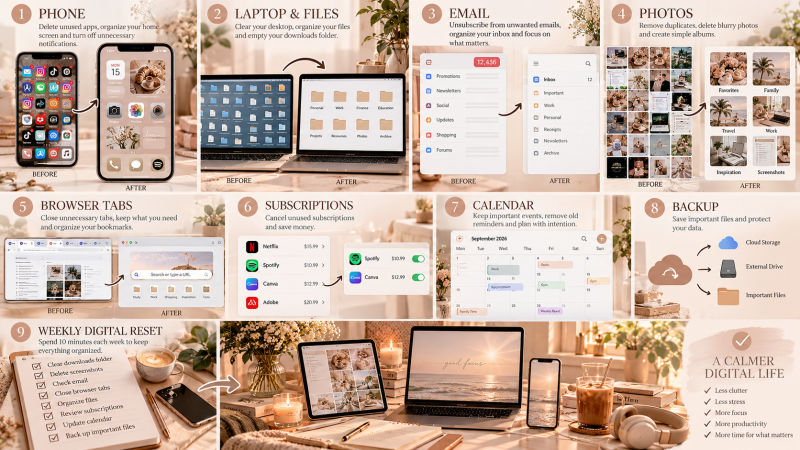
A Calmer Digital Space Starts With Less
Digital organization is ultimately less about having beautifully arranged folders and more about reducing friction. You want to be able to open your laptop and begin working, pick up your phone without being immediately distracted and find important information without searching through hundreds of unnecessary files.
Start with the area causing the most frustration today. Delete what no longer serves a purpose, organize what you genuinely need and create simple homes for the information you want to keep. Then stop. You do not need to achieve a perfectly organized digital life in one day. A useful system becomes stronger through small resets and consistent habits.
The goal is not digital perfection. It is creating a digital space that feels easier to return to, easier to navigate and easier to manage, so your technology can support your life instead of constantly asking for more of your attention.
See you in the next edition. ♡
Dayna Ashfort Studio
Create beautifully. Study smarter. Work with intention.
Kommentar hinzufügen
Kommentare